


Speedometer: GPS Speed Tracker
4.4366.00 Reviews
App Specs
- Version
- 1.36.5
- Updated On
- License
- Free
- Downloads
- 5,000,000+
- Developer
- ZipoApps
- Categories
- Maps & Navigation
- Platform
- Android
Screenshots
 Analysis by AppCompare
Ever been on a road trip and wondered how fast you're actually going? Or maybe you're out cycling and want to track your speed more precisely. That's where Speedometer: GPS Speed Tracker comes in handy! I've been using this nifty app for a bit, and let me tell you, it’s more than just a digital speedometer.
My main reason for opening a separate speed app is to get a quick visual reading without hunting through a larger navigation screen. That makes this kind of tool most useful when the question is simply “How fast am I moving?” rather than “Where should I turn next?” I find it a useful companion for checking a journey, but not a substitute for a map or a vehicle’s safety equipment.
Where a GPS speed reading fits into a trip
A realistic use is a familiar drive in a car whose dashboard display is hard to read, or a bike ride where I want a rough sense of pace between stops. I would set things up before moving, place the phone securely, and glance only when it is safe. On foot, the same basic idea can satisfy curiosity about walking pace, though the reading is more interesting as an estimate over a stretch than as a number to watch every few seconds.
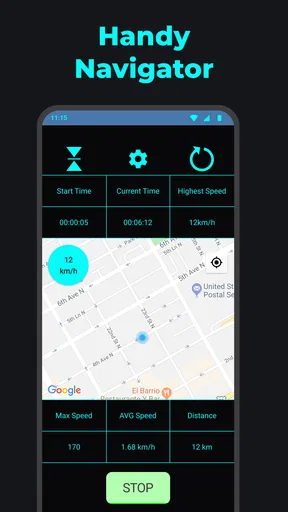
There is a useful distinction between checking speed and navigating. A maps app is the better choice when I need live directions, traffic context, or help choosing a route; this app’s appeal is the focused speed-and-distance task. Keeping those jobs separate can make the screen easier to interpret, but it also means I should not expect this to guide me to a destination.
Getting Started with Speedometer: GPS Speed Tracker
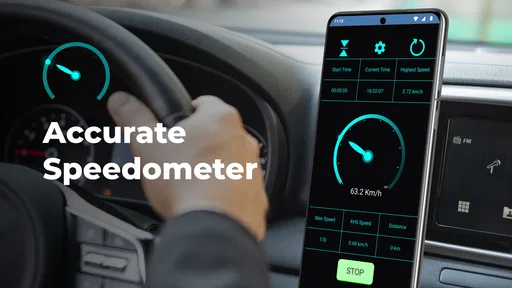
The first thing you'll notice when you fire up Speedometer: GPS Speed Tracker is its sleek and user-friendly interface. It’s designed to be intuitive, so you don’t need a tech degree to figure it out. You simply open the app, and voilà, you're ready to track your speed in real-time. The app uses your phone’s GPS, so make sure your location services are turned on.
For a cleaner first test, I would open it outdoors while stationary and give the GPS a moment to settle before moving. Comparing its reading with a vehicle’s display on a steady, open stretch can help you understand how the two behave, without treating either screen as a reason to take your attention off the road. If the number jumps or pauses in a built-up area, I would wait for a clearer signal rather than making a quick decision from a momentary change.
What I love about this app is its simplicity. You don’t have to wade through endless menus or settings. It’s straightforward, which is perfect when you’re on the go and need quick access. Just open, check your speed, and you’re good to go.
Worth Reading Before You Choose

EA SPORTS FC Mobile 26 Is a Bigger Football Game, but It Takes Time

Flipboard Shows What News Apps Must Do Beyond the Feed

Switching to Android Auto Means Rethinking Your Driving Routine

Google Calendar Makes a Crowded Week Easier to Manage

Ludo King Makes the Most of the Minutes Between Plans

Baby Panda World Brings Quick Play to Modern Phones, but Its Game Library Feels Busy
Features that Stand Out
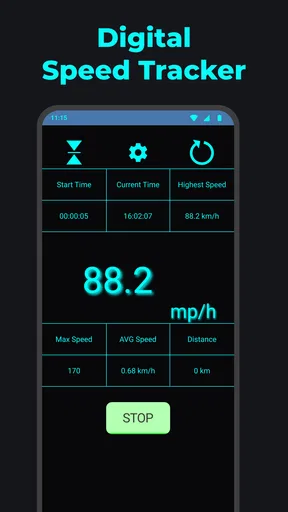
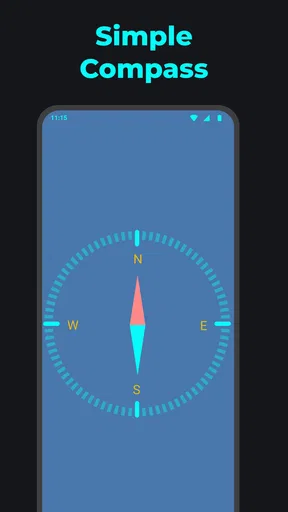
One of the standout features is the ability to switch between different modes. Whether you’re driving, cycling, or just walking, the app adjusts to give you the most accurate speed readings. You can also choose between different units of measurement, like miles per hour or kilometers per hour, which is super handy if you’re traveling abroad.
That unit choice is worth setting before a trip, especially if the local road signs use a different convention from the one I normally read. It avoids doing mental conversions while moving. For a ride or walk, I would also keep the same unit throughout a session so that comparisons between outings remain straightforward; a number is only useful if I know what scale I am looking at.
Another cool feature is the HUD (Heads-Up Display) mode. This transforms your phone screen into a transparent display that you can place on your car’s dashboard. It's like having a futuristic speedometer right in front of you, without any distractions. It’s not just about coolness, though; it makes checking your speed safer since you don’t have to take your eyes off the road.
I would treat the HUD as a visibility option, not a permission to handle the phone while driving. The phone still needs to be mounted securely, positioned without blocking the view, and configured before setting off. Reflections and bright conditions can also affect how easy a projected display is to read, so I would test it while parked and keep the car’s built-in instruments as the primary reference.
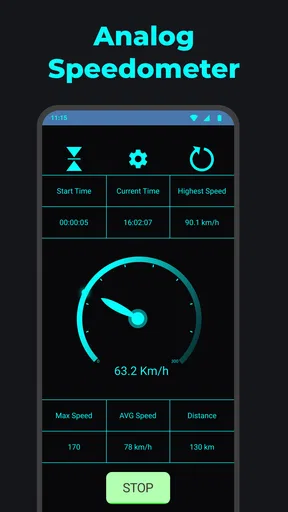
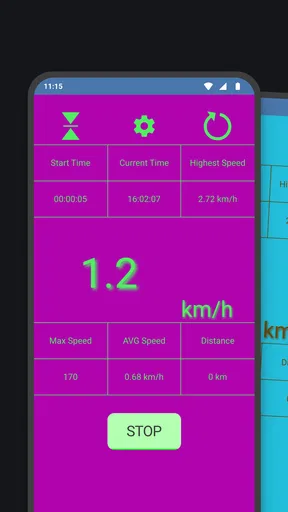
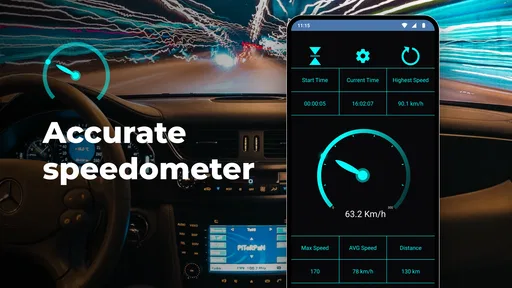
If you're a data geek, you’ll appreciate the trip tracking feature. It logs your journey, giving you insights into your average speed, max speed, and total distance covered. It’s like having a mini dashboard report of your entire trip!
That trip summary can be more useful after the journey than during it. For example, I could compare the distance of a regular cycling loop from one outing to another, or look back at a drive and see how its overall pace differed from what I expected. I would avoid reading a peak speed as a target or as proof of safe driving: a single maximum is easy to misread without the surrounding route and conditions.
Performance and Reliability
As for performance, the app runs smoothly most of the time. Occasionally, if you’re in an area with poor GPS signal, the readings can lag a bit. But that’s more of a GPS issue than a fault with the app itself. Just make sure you’re in an area with decent coverage, and you’ll get reliable results.
GPS readings are best treated as practical estimates, not laboratory measurements. Buildings, tunnels, tree cover, and stop-start movement can all make the signal less consistent, so a brief dip or delay is not necessarily a meaningful change in pace. If the precise reading matters for a formal record or a safety-critical decision, I would use equipment intended for that purpose rather than rely on a phone display alone.
The developers also seem committed to regular updates. I’ve seen a few updates roll out during my time using it, each one bringing minor tweaks and improvements. It’s always nice to see an app that’s actively maintained; it means any bugs you encounter are likely to get squashed pretty quickly.
On the practical side, GPS use depends on the phone being able to receive a usable location signal, so a route through enclosed or obstructed places is not the ideal test. I would also avoid leaving a tracking screen running unnecessarily when I have finished a trip. That simple habit keeps the app focused on the journey I meant to record and avoids confusing one outing with another.
Cost, Value, and Who It Suits
Speedometer is a free app from ZipoApps in the maps and navigation space. It has a 4.3 average from around 43,000 ratings, and more than 5 million installs. It is rated for Everyone, and the current version is 1.36.5, with Android 5.0 or later required. Those figures suggest it has found a broad audience, but they do not tell me whether its GPS reading will suit every phone or every route.
The basic decision is easy: downloading it costs nothing, while in-app purchases range from $0.99 to $279.99 per item. I would start with the free experience and only consider a purchase if I could identify a specific extra I actually wanted in my own use. The wide range makes it especially sensible to check what an individual purchase includes and its price before confirming; I would not assume that paying is necessary to check speed or that every optional item offers equal value.
For a driver, the app makes most sense as a secondary display or a way to review a trip, not as a replacement for built-in vehicle instruments, navigation, or safe driving habits. For cyclists and walkers, it can add a simple pace-and-distance check when a full fitness platform would feel like more than the outing needs. If I wanted route planning, detailed training analysis, or dependable instrument-grade measurements, I would choose a tool designed specifically for that job instead.
My buying advice is therefore a skip on any paid item until its purpose is clear, but a reasonable try for anyone who wants a straightforward GPS-based speed check at no download cost. It is not the right fit for someone expecting turn-by-turn navigation or flawless readings in places where GPS reception is weak. Its value is narrower and more practical: an accessible way to glance at speed and review a trip, provided I understand the limits of a phone-based reading.
Why You Should Give It a Try
So, who’s this app for? Honestly, anyone who’s curious about their speed on the go. It’s great for drivers, cyclists, runners, and even those just out for a leisurely walk. Plus, it’s free to download, so there’s really no reason not to give it a shot.
For a first run, I would choose a familiar, open route, select the unit I use most, and check the reading only when stopped or when a passenger can handle the phone. Afterward, I would look at the trip summary and decide whether the information answered a real question for me. That small trial is a better way to judge its usefulness than paying for optional extras based on curiosity alone.
Overall, Speedometer: GPS Speed Tracker is a solid app that does exactly what it promises. It’s simple, effective, and adds a bit of tech flair to your everyday travels. If you’re looking for a reliable speed tracking app, this one’s definitely worth checking out.
So next time you're on the road, bike, or simply strolling, why not give it a whirl? You might just find it becomes one of your go-to travel companions. Happy tracking!
Pros
- Accurate GPS speed tracking.
- User-friendly interface design.
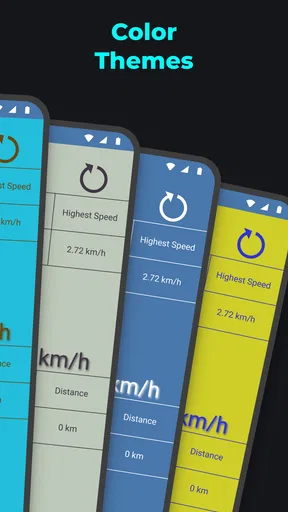
- Customizable display options.
- Works offline without data.
- Real-time speed alerts.
Cons
- May drain battery quickly.
- Limited features in free version.
- Ads in free version can be intrusive.
- Requires GPS for accuracy.
- No integration with other apps.
FAQs for Speedometer: GPS Speed Tracker
How accurate is the Speedometer: GPS Speed Tracker app in measuring speed?
The Speedometer: GPS Speed Tracker app uses your device’s GPS to provide real-time speed measurements, which are generally accurate to within a few miles per hour. However, accuracy can be affected by factors such as GPS signal strength, device orientation, and environmental conditions. It's advisable to use the app in areas with a clear view of the sky for optimal performance.
Can I use the app without an internet connection?
Yes, the Speedometer: GPS Speed Tracker app can function without an internet connection, as it primarily relies on GPS signals to track speed. However, certain features like map updates or online sharing may require a data connection. Ensure your device’s GPS is enabled for offline use.
Is the app compatible with all vehicles and modes of transportation?
The app is designed to work with any vehicle or mode of transportation that allows for GPS tracking, including cars, bicycles, and boats. It's a versatile tool for monitoring speed whether you are driving, cycling, or sailing, as long as your device can maintain a GPS connection.
Does the app track and save my travel history?
Yes, the Speedometer: GPS Speed Tracker app can track and save your travel history, allowing you to review your trips later. However, the extent of data storage may depend on your device’s storage capacity and the app’s privacy settings. Users can typically manage or delete their travel logs within the app.
Are there customizable settings to alert me if I exceed a certain speed?
Yes, the app includes customizable speed alerts. You can set a maximum speed limit, and the app will notify you if you exceed this limit. This feature is particularly useful for ensuring compliance with speed regulations and enhancing travel safety. Adjust the settings based on your preferences.


